
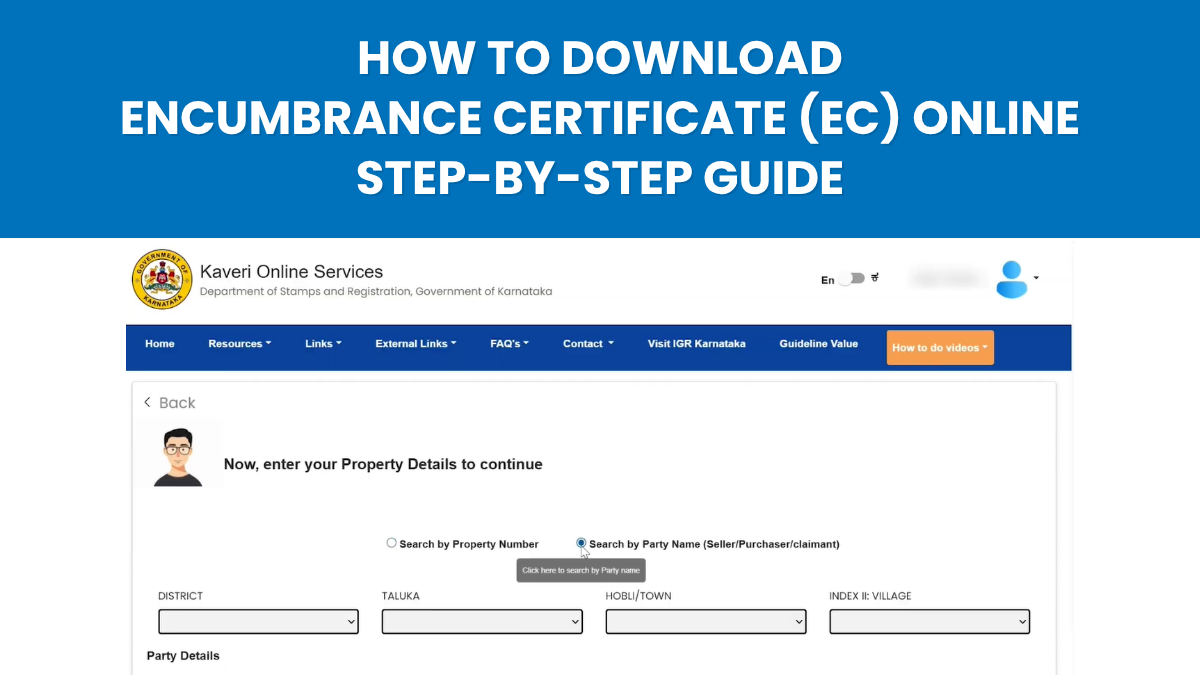
In any property transaction, verifying property records is one of the most important steps in ensuring legal clarity and financial security. One of the key documents used for this purpose is the Encumbrance Certificate (EC).
An Encumbrance Certificate confirms the ownership history of a property and helps identify any registered financial or legal liabilities associated with it. Whether you are buying, selling, applying for a home loan, or completing documentation such as e-Khata, verifying the EC is an essential step in property due diligence.
In Karnataka, the government has simplified this process through the Kaveri 2.0 portal, allowing property owners and buyers to search and apply for EC online without visiting the Sub-Registrar Office.
To help property owners understand this process clearly, we have created a practical step-by-step guide as part of our K.E.Y. (Knowledge Empowers You) Series.
👉 Download the complete EC guide here:
This guide explains the importance of EC, how to search property records, and the step-by-step process to obtain a certified Encumbrance Certificate online.
📄 1. Understanding the Importance of an Encumbrance Certificate
An Encumbrance Certificate (EC) is an official record issued by the Sub-Registrar Office that reflects all registered transactions related to a property during a specific period.
It helps verify whether the property is free from financial or legal obligations, such as:
- Registered sale transactions
- Mortgages or loans secured against the property
- Property transfers or settlements
- Any legally recorded liabilities
Because of this, the EC is commonly required during:
- Property purchase or sale transactions
- Home loan processing by banks
- Legal verification of property ownership
- Applications such as e-Khata or property registration updates
Reviewing the EC allows buyers and property owners to understand the transaction history of a property before making important decisions.
💻 2. Accessing the Kaveri 2.0 Portal
The Kaveri 2.0 portal is the official digital platform provided by the Department of Stamps and Registration, Government of Karnataka.
Through this portal, users can access several property-related services, including:
- Searching Encumbrance Certificates
- Applying for certified EC copies
- Tracking application status
- Downloading approved documents
To use these services, users must first create a login account on the portal by registering basic details.
🔗 Visit the Kaveri 2.0 Portal:
https://kaveri.karnataka.gov.in
Once registered, users can access the dashboard and use the EC search feature.
🔍 3. Searching for Property Records on the Portal
After logging into the portal, users can access the Encumbrance Certificate search service from the dashboard.
The system allows two main search methods depending on the information available.
Property-Based Search
This method requires property details such as:
- District
- Taluk
- Village
- Survey number or property number
By entering the correct property details, the portal retrieves records associated with the property.
Owner Name Search
If property details are not readily available, users can search using the name of the registered property owner.
Once the search is completed, the portal generates a preview version of the Encumbrance Certificate for review.
📑 4. Reviewing the EC Preview
Before applying for a a certified EC, users should carefully review the preview document generated by the portal.
The preview typically includes:
- Property description
- Owner details
- Transaction records within the selected time period
Reviewing this information helps ensure that the correct property has been identified and that the transaction history appears accurate.
If the details match the intended property, the user can proceed to apply for the certified EC copy.
🧾 5. Applying for a Certified Encumbrance Certificate
Once the preview details are verified, users can proceed with the application for a certified Encumbrance Certificate.
The process generally involves the following steps:
- Confirm the property details displayed in the preview
- Submit the EC application through the portal
- Pay the applicable government fee online
- Complete Aadhaar-based e-Sign verification
- Submit the digitally signed application
After submission, the application is forwarded to the jurisdictional Sub-Registrar Office for verification.
🔐 6. Aadhaar-Based e-Sign Verification
To complete the EC application, the portal requires Aadhaar-based digital verification.
Applicants must complete OTP authentication through Aadhaar e-KYC, which allows the application to be electronically signed.
This step confirms the identity of the applicant and ensures that the submission complies with the government’s digital authentication requirements.
🏢 7. Verification by the Sub-Registrar Office
After submission, officials at the Sub-Registrar Office review the application and verify the property records.
This verification process ensures that:
- The property records match the application details
- The transaction history is correctly recorded
- The EC can be issued as an official certified document
Once verification is completed, the Sub-Registrar digitally signs the Encumbrance Certificate, making it an officially certified document.
📥 8. Tracking and Downloading the EC
Applicants can track the status of their EC request directly through the Kaveri 2.0 portal dashboard.
The portal allows users to:
- View submitted applications
- Monitor the processing status
- Download the digitally signed EC once it is approved
The final document can then be used for property transactions, financial documentation, or legal verification.
🎥 Step-by-Step Video Guide
While the process is straightforward, many users prefer seeing the steps visually before applying.
To make the process easier to understand, we have created a step-by-step video walkthrough demonstrating how to download the Encumbrance Certificate from the Kaveri 2.0 portal.
🎥 Watch the video guide here:
📘 Summary
The Encumbrance Certificate (EC) is an important document that helps verify a property’s ownership history and identify any registered liabilities.
With the Kaveri 2.0 portal, property owners and buyers can now search, apply for, and download EC documents online without visiting the Sub-Registrar Office.
Understanding the EC process helps ensure better due diligence and more informed property decisions.
Disclaimer
The information shared in this article is intended for general guidance only and does not constitute legal advice. Processes, timelines, and requirements may vary based on individual circumstances and applicable government regulations. Please consult official government sources or qualified professionals for property-specific guidance.